The Moth
Developer, Former MVP, now at Microsoft - Best of
2004
,
2005
,
2006
,
2007
,
2008
,
2009
« PDC2008: Can you afford not to be there?...
|
Home
|
The future: Spatial Computing »
Parallel Stacks for multi-threaded debugging
Sat, September 27, 2008, 02:57 PM under
ParallelComputing
My previous post (on
active stack frame and current thread
) ended by raising an issue, a solution to which I propose below.
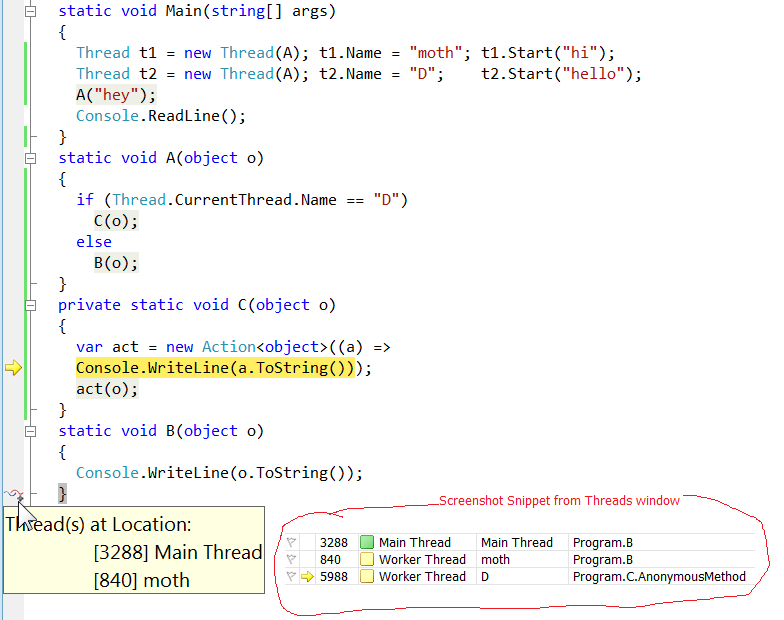
Consider the following screenshot of code (inc. snippet from Threads window) that has hit a breakpoint and envisage the call stacks for each thread before reading the rest of this blog post:
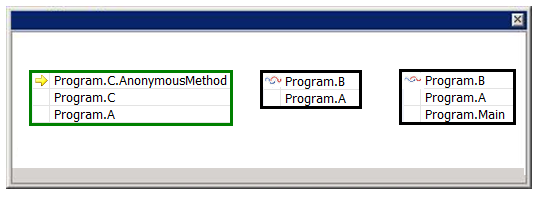
As a developer debugging a multi-threaded app, you need the ability to view call stacks of multiple threads at the
same
time ā not just a single one at a time. What would you wish this to look like? The obvious solution would be a window like this:
If we can get to the stage above, why not aim for a few more goals: Draw it as a call graph (method calls go from top to down) and, more importantly, visually indicate when threads share common method call paths. Here is a picture (identical info to previous picture) delivering on those goals:
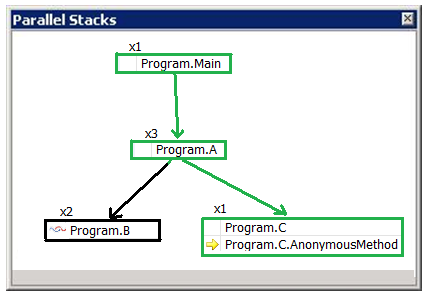
The āxNā indicates that the call stack segment box is shared by N threads. To piece together the entire call stack for a thread, we mentally concatenate the boxes vertically. So the diagram above reads as follows:
"One thread started in Main. It then called A; A was called by 3 threads in total, so we can deduce that 2 other threads have started their life in A. Of the 3 threads, 2 called B (and that is where their active stack frame is right now). The remaining one thread from A called C and subsequently an AnonymousMethod from C and that is where its active stack frame is now (this is also the current thread)."
What do you think? How can you make this better or what alternative do you propose?
Comments [9]
|
Permalink
Saturday, September 27, 2008 5:36:00 PM (Pacific Daylight Time, UTC-07:00)
I really like the idea of describing the thread callstacks as a graph.
However, the "xN" notation seems tough to wrap your mind around at first. There could be a lot of unproductive time spent reasoning about it, like "Ok, there is an x3 down here and an x1 up here, so that means....there must have been 2 threads created up here."
How about taking this idea just a step further and explicitly showing an arrow path (perhaps with a different color) for each thread? Also, the creation of a new thread can be automatically determined and shown with a specific symbol.
I made a mockup of what this might look like:
http://thevalerios.net/matt/downloads/pics/ThreadCallstackGraph.jpg
Possible usability enhancements:
- Clicking on a thread arrow highlights that arrow all the way up to the top (e.g. with a thicker line)
- Double-clicking on a method box takes you to the code
- Hovering over the thread arrow shows you a tooltip box with more information (Type of thread, ID, etc)
Just an idea -- hope that helps. :)
mattman206
Sunday, September 28, 2008 2:58:00 AM (Pacific Daylight Time, UTC-07:00)
Reminds me of these things:
*
Future Focus: Call Hierarchy
*
Charlie Calvert's Community Blog : Future Focus II: Call Hierarchy:
*
Visual Studio Language Futures - Discussions: Call Hierarchy
Anonymous
Wednesday, October 01, 2008 12:11:53 PM (Pacific Daylight Time, UTC-07:00)
mattman206: Thanks for thinking about this.
The xN is a bit hard to wrap your head around at first, but it is actually very easy and quick to interpret once you are used to it. Of course, I could be wrong, but once you get a chance to play with this feature, ping me again. We are also thinking of changing it to say "4 Threads", so it does not need explaining every time
The arrow path idea is great for a small number of threads. However, I don't think the idea scales to, say, 16 or 64 threads :-(.
Some things you will like (along the same lines of what you suggested): hovering over the xN area will show you in a tooltip the Thread IDs. Also hovering over a method will show you a tooltip with information for all stack frames at that method (parameter info, line numbers etc). Finally, indeed you will be able to switch the current stack frame from this window. Double clicking doesn't cut it when more than one thread is in the same method, because you need to specify which one exactly: so there will be a contextmenu :-)
Keep your ideas coming!
Daniel Moth
Wednesday, October 01, 2008 12:17:42 PM (Pacific Daylight Time, UTC-07:00)
Anonymous: Not sure why a static analysis code editor feature reminds you of a debugging dynamic runtime feature. Either you missed the point or you need to provide more context (and a name for yourself ;))
Daniel Moth
Sunday, October 12, 2008 4:19:00 PM (Pacific Daylight Time, UTC-07:00)
I think you are making it too complex. At debug time, I would have ideally just liked to know call stack for thread T. For a complex project the kind of graph you have shown get really complex (may look like spider web!), hard to navigate and defeat the purpose. I would highly recommand to keep this simple. If you do want to include call stack graph, please also leave the option so developers can switch to simple flat view.
Shital
Sunday, October 12, 2008 4:28:38 PM (Pacific Daylight Time, UTC-07:00)
Shital: Thank you for your comments. The old Call Stack window is not going anywhere for the time being, so you don't have to worry. Devs that do not use multithreaded code can still focus on just one thread at a time. Devs that debug complex multithreaded apps, can use the Parallel Stacks window to have a holistic picture of the execution of their code and the ability to jump at any method on any stack with a couple of clicks in a single window. If they need to focus on a subset of threads or tasks, we are considering offering that via some filtering mechanism. Also note that the picture would never look like a "spider web" since the branches never come back together (that would indeed be too complex). Instead, you can think of it as an upside down cactus ;-)
Daniel Moth
Monday, October 20, 2008 7:41:00 AM (Pacific Daylight Time, UTC-07:00)
I like your idea of a graph but I would like to see it as the result of a log. My question below pertains to logging parallel call stacks.
I have been searching MSDN for three days now for this question (please forgive me if I have posted to the wrong forum).
Is it possible to log the call stack the current thread and append to that all the frames leading up to it? In other words, can an application (in debug or with a custom debugger, etc) trace call stack frames of parent threads up to the run command of each child? If not can a custom debugger trace the current call stack of a parent thread upon childThread.run?
Thank you very much.
Anonymous
Friday, February 13, 2009 8:27:15 AM (Pacific Standard Time, UTC-08:00)
Anonymous: I don't have an answer for your question and, yes, this is the wrong forum. For free online answers to generic developer questions on the Microsoft platform, please use the MSDN forums: http://forums.microsoft.com/msdn/default.aspx?siteid=1
Daniel Moth
Wednesday, June 03, 2009 6:59:56 AM (Pacific Daylight Time, UTC-07:00)
This
already exists
in a simplified form. You can download it as a plugin for Visual Studio 2008 today...
Mark O'Connor
Comments are closed.
About
My team's page on MSDN
Subscribe
Contact Form
My screencasts on channel9
Tags
AboutPresenting (5)
Blogging (7)
Career (5)
Communication (5)
dotNET (120)
Events (93)
GPGPU (2)
HPC (6)
IE7 RSS (6)
Links (129)
LINQ (23)
MobileAndEmbedded (148)
Orcas (128)
ParallelComputing (63)
Personal (32)
Random (42)
SideShow (12)
Silverlight (17)
SoftwareProcess (3)
UAC (14)
UserInterfaceDesign (5)
Vista (84)
VisualStudio (112)
Whidbey (31)
Windows (90)
WindowsServer2008 (3)
Latest Posts
Parallel Computing Platform Developer Lab
Slides and code for MPI Cluster Debugger
DirectCompute
GPGPU
Code for Parallelism Features Tour
Managed code and the Shell ā Do?
Dev Lead Job opening on my team
Best of "The Moth" 2009
Bug Triage
Parallel Computing Features Tour in VS2010
MPI Cluster Debugger launch integration in VS2010
Parallel Debugging
"Parallel Programming Talk" show
Message Passing Interface (MPI)
Windows HPC Server links
Extension Manager in Visual Studio 2010
Core debugger enhancements in VS2010
Dump debugging with Parallel Stacks
Slides for Parallel Debugging windows
MPI Project Template for VS2010
Archives
March, 2010 (2)
February, 2010 (3)
January, 2010 (3)
December, 2009 (1)
November, 2009 (11)
October, 2009 (12)
September, 2009 (1)
August, 2009 (6)
July, 2009 (5)
June, 2009 (3)
May, 2009 (7)
April, 2009 (5)
March, 2009 (3)
February, 2009 (4)
January, 2009 (6)
December, 2008 (3)
November, 2008 (12)
October, 2008 (6)
September, 2008 (9)
August, 2008 (5)
July, 2008 (5)
June, 2008 (8)
May, 2008 (18)
April, 2008 (11)
March, 2008 (13)
February, 2008 (17)
January, 2008 (15)
December, 2007 (20)
November, 2007 (25)
October, 2007 (19)
September, 2007 (11)
August, 2007 (31)
July, 2007 (24)
June, 2007 (19)
May, 2007 (24)
April, 2007 (18)
March, 2007 (35)
February, 2007 (34)
January, 2007 (17)
December, 2006 (18)
November, 2006 (17)
October, 2006 (23)
September, 2006 (22)
August, 2006 (15)
July, 2006 (15)
June, 2006 (13)
May, 2006 (10)
April, 2006 (5)
March, 2006 (1)
February, 2006 (1)
January, 2006 (2)
December, 2005 (5)
November, 2005 (4)
October, 2005 (3)
September, 2005 (8)
August, 2005 (17)
July, 2005 (11)
June, 2005 (7)
May, 2005 (24)
April, 2005 (15)
March, 2005 (15)
February, 2005 (18)
January, 2005 (23)
December, 2004 (24)
November, 2004 (25)
October, 2004 (10)
September, 2004 (23)
August, 2004 (12)
July, 2004 (1)