Saturday, June 17, 2006


We looked at glass in Vista previously so please read that to make sure we are on the same page and using the same terminology... I'll wait...

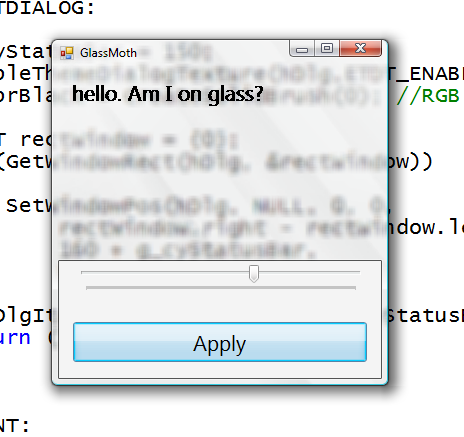
Great, now that you are back, let's see how to get glass in our C# applications. For starters, if glass is supported and enabled on the user's PC, then your non-client area will by default get the glass effect. In other words, the titlebar and borders will have glass (nothing more for you to do). The question is how to extend that into the client area like other OS applications do (as we saw last time).

There are 3+1 things we need to do:
1. Check that it is supported before proceeding further.
2. Extend the frame into the client area.
3. Paint the extended area black.

Optionally,
4. Allow the user to drag our window by pressing in the glass area as if they were pressing on the window's caption bar.

So let's go!

1. First, let's make sure we are not on a legacy OS:
    if (Environment.OSVersion.Version.Major < 6)
{
Debug.WriteLine("How about trying this on Vista?");
return false;
}
After that, we need to check that glass is enabled by using the DwmIsCompositionEnabled API which resides in Desktop Window Manager (dwmapi.dll)
    // [DllImport("dwmapi.dll")]static extern void DwmIsCompositionEnabled(ref bool pfEnabled);
bool isGlassSupported = false;
DwmIsCompositionEnabled(ref isGlassSupported);
return isGlassSupported;
2. Extending the frame requires setting up a margins structure and passing it to another DWM API: DwmExtendFrameIntoClientArea.

So if we want to extend a bit from the top of the window(i.e. we don't care about extending from the bottom, left or right sides) we can use the following code:
    // [DllImport("dwmapi.dll")]static extern void DwmExtendFrameIntoClientArea(IntPtr hWnd, ref Margins pMargins);
Margins marg;
marg.Top = 20; // extend 20 pixels from the top
marg.Left = 0;
marg.Right = 0;
marg.Bottom = 0;
DwmExtendFrameIntoClientArea(this.Handle, ref marg);
3. If you run your winforms app now, you'll find a black strip at the top. This is where we need the alpha blending and using a black brush does just that (tricking GDI that has no notion of an alpha channel).

So, in your form's paint event handler add the following code:
    SolidBrush blackBrush = new SolidBrush(Color.Black);
g.FillRectangle(blackBrush, 0, 0, this.ClientSize.Width, marg.Top);
4. Moving the form programmatically can easily be achieved by catching the mouse down/up/move events and some simple logic but instead we can use the following magic:
// make windows do the work for us by lieing to it about where the user clicked
protected override void WndProc(ref Message m)
{
base.WndProc(ref m);

if (m.Msg == 0x84 // if this is a click
&& m.Result.ToInt32() == 1 // ...and it is on the client
&& this.IsOnGlass(m.LParam.ToInt32())) // ...and specifically in the glass area
{
m.Result = new IntPtr(2); // lie and say they clicked on the title bar
}
}

private bool IsOnGlass(int lParam)
{
// get screen coordinates
int x = (lParam << 16) >> 16; // lo order word
int y = lParam >> 16; // hi order word

// translate screen coordinates to client area
Point p = this.PointToClient(new Point(x, y));

// work out if point clicked is on glass
if (y < marg.Top)
return true;

return false;
}
5. There is no 5 :-) Just as a gotcha, if you decide to extend the client frame after the form has been displayed (and hence its handle has been created), you should call
this.RecreateHandle();

Note that there are other simpler approaches that use winforms Transparency but they seem to suffer from a very undesirable effect: When the user clicks on the glass area they are actually clicking on whatever is behind the form (true transparency is not what we want here).

Download a complete sample here.

Labels:


Comments:
Hi Daniel!

I am using your method to accomplish the glass effect in my windows but i have a probolem: as soon as i choose the basic style the inside of the window turn black while te explorer windows etc. stay having a background according to the frame.
Do you ba any chance know how to make it look like the explorer windows?

thanks for the reply.

 
_________________

ewodos: You need to handle that yourself. Only extend the margins and paint black if DwmIsCompositionEnabled. If the user changes the theme on the fly, then you must hook into the windows message WM_DWMCOMPOSITIONCHANGED.

For any further issues, please use the Vista UI forums.

 
_________________

Thx!

This is the only place I have found that taught me how to do this. I looked for about 3 weeks!

 
_________________

Hi Daniel.
I'm trying to put this efect inside a panel, unsuccesfully... Is there any rules for glass to be applied to a form? Like, only across the whole width? Must I draw the panel on glass, instead of "glassing" the background of it?
Thx

 
_________________

Hi Daniel,

I have used your glass tutorial to create a glass form where the whole client area is filled with the glass effect. the problem that i am experiencing is the text on controls is also drawn with the glass effect. is there any way i can get around this? i have tried changing the fore colour of the controls to something other than black but this seems to have no effect.

Awesome whats new for the web developer in visual studio 2008 conference by the way

 
_________________

Lucas: Glad you found this resource useful.

Marcelo: Sorry, I really don't know – please try the Vista UI forums: http://forums.microsoft.com/MSDN/ShowForum.aspx?ForumID=117&SiteID=1

WraithNath: Great that you enjoyed the conference session. Please see if any of the many links from this blog post help (http://www.danielmoth.com/Blog/2006/10/vb6-does-glass-on-vista.html) and if not please use the Vista UI forums.

 
_________________

Hi! Friend, do you how we can get this glass on VB.net please...
Thank you in advance.

 
_________________

The comparison in IsOnGlass()
if (y < marg.Top)
should be
if (y > marg.Top)

Otherwise the window won't move if the click occurs out of the title bar.

 
_________________

I have a problem, I made a simple class GlassForm. Then when I create a form of type GlassForm, It all works real nice except;
All my controls are drawn under the glass effect, causing every control; buttons, lable, textboxes ect. ect. To look "Strange..."
I don't want that, I want my glass applied to the form only and not the controls. Any suggestions?
I use this source for my GlassForm, use it if you like:

using System;
using System.Collections.Generic;
using System.ComponentModel;
using System.Data;
using System.Drawing;
using System.Linq;
using System.Text;
using System.Windows.Forms;
using System.Drawing.Drawing2D;

namespace CustomForms
{
public partial class FormGlass : Form
{
#region constant
const string DW_MAPI_DLL = "dwmapi.dll";
#endregion
#region public

#region pubnlic structs
public struct MARGINS
{
public int cxLeftWidth;
public int cxRightWidth;
public int cyTopHeight;
public int cyBottomHeight;
}
#endregion

#region constructor
public FormGlass()
{
fMARGINS.cxLeftWidth = 0;
fMARGINS.cxRightWidth = 0;
fMARGINS.cyBottomHeight = 0;
fMARGINS.cyTopHeight = 0;
if (System.Environment.OSVersion.Version.Major >= 6) //make sure that you using Windows Vista
{
DwmIsCompositionEnabled(ref IntegerGlassEnabled); //check if desktop compositon is enabled
}
SetMargins();
}
#endregion

#region properties
public int cxLeftWidth
{
get
{
return fMARGINS.cxLeftWidth;
}
set
{
fMARGINS.cxLeftWidth = value;
SetMargins();
}
}

public int cxRightWidth
{
get
{
return fMARGINS.cxRightWidth;
}
set
{
fMARGINS.cxRightWidth = value;
SetMargins();
}
}

public int cyTopHeight
{
get
{
return fMARGINS.cyTopHeight;
}
set
{
fMARGINS.cyTopHeight = value;
SetMargins();
}
}

public int cyBottomHeight
{
get
{
return fMARGINS.cyBottomHeight;
}
set
{
fMARGINS.cyBottomHeight = value;
SetMargins();
}
}
#endregion

#endregion

#region private

#region private DLL import
[System.Runtime.InteropServices.DllImport(DW_MAPI_DLL)]
private extern static int DwmIsCompositionEnabled(ref int en);
[System.Runtime.InteropServices.DllImport(DW_MAPI_DLL)]
private extern static int DwmExtendFrameIntoClientArea(IntPtr hwnd, ref MARGINS margin);
#endregion

#region private variables
private MARGINS fMARGINS = new MARGINS();
private int IntegerGlassEnabled = 0;

#endregion

#region private functions
private void SetMargins()
{
if (IntegerGlassEnabled > 0) //No messages, From has glas, or not.
{
this.BackColor = Color.Black;
DwmExtendFrameIntoClientArea(this.Handle, ref fMARGINS);
}
}
#endregion
#endregion

}
}

 
_________________

Post a Comment

Please keep comments directly relevant to this blog post. Remember that generic support questions are best posted to the MSDN Forums.

Note that Anonymous comments are likely not going to appear so Sign-in or at least pick a Name even if you don't have a URL.


« Latest Posts

Copyright © Daniel Moth