The Moth
Developer, Former MVP, now at Microsoft - Best of
2004
,
2005
,
2006
,
2007
,
2008
,
2009
« Out of Office
|
Home
|
Vista: WFP and WER »
Vista UAC Security Policies
Mon, September 4, 2006, 05:20 PM under
Windows
|
Vista
|
UAC
In the office today I was reading a popular PC magasine here in the UK and in the contents it said Dave (sorry I forget surname) looks at User Account Control in Windows Vista. I went to the page and read the article that left me quite disappointed. First, it doesn't really explain the goals behind UAC and how UAC achieves that: this information is available online (two clicks from my blog entry on
User Account Control
). Second, over half of the article is basically what seems to me a rant on the 'virtualization' feature (again, I cover virtualization on my
UAC
post). While I advise devs not to take advantage of virtualisation, I understand its purpose in offering crutches to some legacy applications that would otherwise break. In any case, the most disappointing thing about the article was that it didn't even mention how to turn off virtualization. While I did this at the nugget I link to from
here
, let's repeat it in written form.
1. In your Windows start menu go to the search box and type "sec" to bring up the "Local Security Policy"
2. Navigate to 'Security Settings->Local Policies->Security Options' and scroll to the bottom.
3. There you'll find 9 policies pertaining to User Account Control. Double click on the last one ("Virtualize file and registry write failures to per-user locations")
4. Change the value from Enabled to Disabled
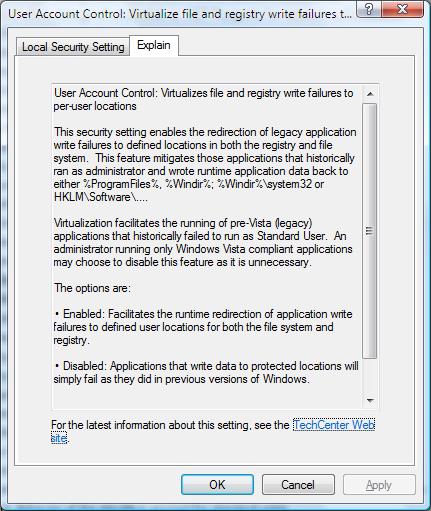
With Vista RC1 there is an improvement to the dialogs that come up for each policy. There is an additional tab: "Explain". Click on this one to read about what the policy does
For the policy we've been talking about it looks like this:
I leave it to you to read the explanations for the other 8 policies:
- Switch to the secure desktop when prompting for elevation
- Run all users, including administrators, as standard users
- Only elevate UIAccess applications that are installed in secure locations
- Only elevate executables that are signed and validated
- Detect application installations and prompt for elevation
- Behavior of the elevation prompt for standard users
- Behavior of the elevation prompt for administrators in Admin Approval Mode
- Admin Approval Mode for the Built-in Administrator account
BTW, with RC1 (build 5600), the number of UAC prompts you get is significantly smaller than earlier builds so go check it out!
Comments [0]
|
Permalink
Comments are closed.
About
My team's page on MSDN
Subscribe
Contact Form
My screencasts on channel9
Tags
AboutPresenting (5)
Blogging (7)
Career (5)
Communication (5)
dotNET (120)
Events (93)
GPGPU (2)
HPC (6)
IE7 RSS (6)
Links (129)
LINQ (23)
MobileAndEmbedded (148)
Orcas (128)
ParallelComputing (63)
Personal (32)
Random (42)
SideShow (12)
Silverlight (17)
SoftwareProcess (3)
UAC (14)
UserInterfaceDesign (5)
Vista (84)
VisualStudio (112)
Whidbey (31)
Windows (90)
WindowsServer2008 (3)
Latest Posts
Parallel Computing Platform Developer Lab
Slides and code for MPI Cluster Debugger
DirectCompute
GPGPU
Code for Parallelism Features Tour
Managed code and the Shell – Do?
Dev Lead Job opening on my team
Best of "The Moth" 2009
Bug Triage
Parallel Computing Features Tour in VS2010
MPI Cluster Debugger launch integration in VS2010
Parallel Debugging
"Parallel Programming Talk" show
Message Passing Interface (MPI)
Windows HPC Server links
Extension Manager in Visual Studio 2010
Core debugger enhancements in VS2010
Dump debugging with Parallel Stacks
Slides for Parallel Debugging windows
MPI Project Template for VS2010
Archives
March, 2010 (2)
February, 2010 (3)
January, 2010 (3)
December, 2009 (1)
November, 2009 (11)
October, 2009 (12)
September, 2009 (1)
August, 2009 (6)
July, 2009 (5)
June, 2009 (3)
May, 2009 (7)
April, 2009 (5)
March, 2009 (3)
February, 2009 (4)
January, 2009 (6)
December, 2008 (3)
November, 2008 (12)
October, 2008 (6)
September, 2008 (9)
August, 2008 (5)
July, 2008 (5)
June, 2008 (8)
May, 2008 (18)
April, 2008 (11)
March, 2008 (13)
February, 2008 (17)
January, 2008 (15)
December, 2007 (20)
November, 2007 (25)
October, 2007 (19)
September, 2007 (11)
August, 2007 (31)
July, 2007 (24)
June, 2007 (19)
May, 2007 (24)
April, 2007 (18)
March, 2007 (35)
February, 2007 (34)
January, 2007 (17)
December, 2006 (18)
November, 2006 (17)
October, 2006 (23)
September, 2006 (22)
August, 2006 (15)
July, 2006 (15)
June, 2006 (13)
May, 2006 (10)
April, 2006 (5)
March, 2006 (1)
February, 2006 (1)
January, 2006 (2)
December, 2005 (5)
November, 2005 (4)
October, 2005 (3)
September, 2005 (8)
August, 2005 (17)
July, 2005 (11)
June, 2005 (7)
May, 2005 (24)
April, 2005 (15)
March, 2005 (15)
February, 2005 (18)
January, 2005 (23)
December, 2004 (24)
November, 2004 (25)
October, 2004 (10)
September, 2004 (23)
August, 2004 (12)
July, 2004 (1)