Wednesday, March 28, 2007
One reader also got a corrupt manifest XML file somehow and the culprit there was the embedded copyright symbol that I have now removed from the file even though it hadn't caused me any issues…
Labels: IE7 RSS
Wednesday, October 11, 2006
For web devs this means making sure your web pages work on IE7. It should, as a lot of effort was put into compatibility apparently, but all those CSS improvements and security enhancements (especially “protected mode” on Vista) may break you... who knows (other than you!)
I am not a web dev so I just see this from an end-user's perspective. I have switched to IE7 for a while now. You may think "Yeah, since you can't run IE6 side by side with IE7, obviously you have switched in order to dogfood IE7". Well, yes that is true, but to be perfectly honest with you, I meant that I switched from Firefox. That's right, I am one of the crowds that switched from IE to Firefox just over a year ago and now I have switched back (with my only gripe being no free ad-blocker out of the box, but I might be tempted by an add-on).
The main thing firefox gave me is now present in IE7: Tabbed browsing (and it is done a lot better IMO with closing/newing/previewing hitting the sweet spot).
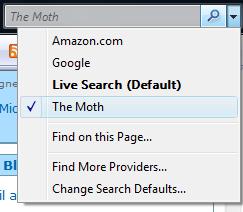
Other things I like are the RSS integration (inc. RSS platform), easy page zooming, printing now does the right thing by default and integrated search that lets me add custom search providers e.g. I've added one that searches my blog:
The other thing, which is quite significant, is that IE7 just seems a lot faster (I wonder if someone can prove that for me please, I just know it is true).
Of course, there are websites out there doing stupid things like checking if they recognise the browser. In other words, an idiotic person wrote code that says "I explicitly recognise IE6 and support it, but anything else that will come in the future I will just not render and give out a silly message". As you can probably tell by the emotion in my statement, I have been dealing with such a 3rd party crap website to order my company car... anyway... if you are in that scenario too, you can always spoof the website by using this user agent tool (even more useful on Vista where there seems to be no way to remove IE7+).
Bottom line... try IE7 if you haven't already... you will like it (screenshot in my previous blog post).
I hate to make all this sound like an advert, but see it as my way of saying "thank you" to the IE team for a product I genuinely like!
Labels: IE7 RSS
Friday, August 04, 2006
Please see my blog post with a short example of utilising managed code for using the RSS API (skip to the code section and keep it in mind while reading the following).
What I want to do here is provide some tips for when you start using the RSS API.
1. It is a COM dll, so locate and reference msfeeds.dll (Microsoft Feeds, version 1.0) from the COM tab in the Visual Studio references dialog
2. This will bring in Microsoft.Feeds.Interop which is also the namespace you use from code
3. Everything starts with the FeedsManager and his RootFolder property (there is always a implicit root folder).
4. The object hierarchy is RootFolder->Subfolder->subfolder->feed->feeditem->feedenclosure
5. Most class/interface members return an object typed as System.Object. That means you have to do some casting in your code e.g. the Feeds and Subfolders properties in my example have to be cast to IFeedsEnum.
To help you navigate the RSS API, in addition to the links and descriptions above, check out the 4 class diagrams I laid out (collectively, the depict the entire API):
FeedManager , Folder and Feed , Item and Enclosure , Events
Now go to our nuggets page and watch one (by MikeT) on how to build an RSS viewer in C# using the API.
Labels: IE7 RSS
Wednesday, August 02, 2006
We already looked at how I deleted all the feeds in Outlook 2007 in one go, and not one by one.
Luckily IE7 understands folder structures from opml but somehow I managed to get them all in a flat list in IE as well (probably outlook messed that up for me or maybe a glitch with IE7 Beta 2 that I was using or something else, not important now).
So how do you delete all feeds in IE7? Out of the box you can't. Fastest end user way would be to create a folder and drag them all in it one-by-one and then delete the folder - yuck!
Another way is to be stupid and delete the contents of the Windows RSS Platform store directly (after shutting down all apps that use it, including IE7 of course). The feed store currently (Beta 3) is here:
"[drive letter]:\Documents and Settings\[user name]\Local Settings\Application Data\Microsoft\Feeds\[your feeds and folders]"
For me however, this was the opportunity I needed to test drive the RSS API. Unfortunately, it is so easy to use that I could achieve what I wanted with a dozen lines of code so here is my simple effort:
using Microsoft.Feeds.Interop;Also note that the code should explicitly release the COM objects. In other words, wherever you have a reference to an object, when you are done with it call:
class Program
{
static void Main(string[] args)
{
IFeedsManager fm = new FeedsManagerClass();
IFeedFolder ff = (IFeedFolder)fm.RootFolder;
System.Console.WriteLine("Starting deletion at root");
DeleteFolder(ff);
System.Console.WriteLine("Deleted all feeds!");
System.Console.ReadLine();
}
private static void DeleteFolder(IFeedFolder ff)
{
DeleteFeedsInFolder(ff);
System.Console.WriteLine();
foreach (IFeedFolder sf in (IFeedsEnum)ff.Subfolders)
{
System.Console.WriteLine("Deleting subfolder '{0}'", sf.Name);
//DeleteFolder(sf); //not needed really but it can demo recursion
sf.Delete();
}
}
private static void DeleteFeedsInFolder(IFeedFolder ff)
{
foreach (IFeed feed in (IFeedsEnum)ff.Feeds)
{
System.Console.WriteLine("Deleting feed {0}", feed.Name);
feed.Delete();
}
}
}
System.Runtime.InteropServices.Marshal.ReleaseComObject(f);
Labels: IE7 RSS
Tuesday, August 01, 2006
While evaluating whether I want to switch from my current aggregator to the outlook12+IE7 combo, I messed up and ended up with a looong flat list of feeds in Outlook (since outlook doesn't understand folder hierarchy in opml). So I wanted to delete *all* the feeds and while I can do that one by one, there was no mechanism to just get rid of all of them in one go (no folder multiselect).
In case you are wondering, even if you delete the subscriptions from outlook through the 'RSS Feeds' tab on the 'Tools->Account Settings' dialog, all the feed folders you have under the 'RSS Feeds' folder remain (kind of makes sense so you don't lose any cached content). Also note that by default the RSS subscriptions are stored on exchange (which is good because you have access to them from multiple machines through OWA, but also can be bad if your server pst size limit is small).
So anyway, this is unsupported and not recommended and definitely comes with no warranties and everything else in my disclaimer applies. With that out of the way, this is how got rid of all the feeds in one go:
1. Close Outlook 2007 Beta 2
2. Launch Outlook 2003 and connect it to the same exchange server
3. Notice how the RSS Feeds appears as a *regular* folder in Outlook 2003 (it treats it as any other user-created folder)
4. Delete the "RSS Folder" (obviously you can't do that in O12 as it is special, as the icon indicates)
The above worked for me so capturing it here in case it helps anyone but, again, do this at your own risk.
Labels: IE7 RSS
Monday, July 31, 2006
The Windows RSS Platform ships with IE7 and hence is available not only with Vista but on WinXP too.
It has several elements:
1. Background Download component
2. Common Feed List
3. Store of feed items
4. Store of enclosures (think attachments, e.g. think podcasts)
5. RSS Object Model (more on the API in a later post)
Applications running on Windows have a choice as to which of these components they want to use - in other words it is not an all or nothing approach. For example IE7 uses the lot while Outlook 2007 optionally uses the Common Feed List (more on O12 later).
I am not going to drill into any of the above since there are mountains of information out there. Below are some links to get you started:
- The BTB033 session at Mix06
(also, if you can get hold of the PDC2005 material, check out the session on 'RSS in Windows Vista' again by Walter vonKoch - that was a clue as to who you should send any feedback that you have)
- A handful of overviews on MSDN
- An older article on MSDN
- RSS platform on the RSS Team blog
Labels: IE7 RSS
Copyright © Daniel Moth


