Tue, April 15, 2008, 01:49 AM under
Silverlight
Silverlight applications can store data (in files) onto the user's machine via the good old
Isolated Storage mechanism. The API and restrictions of Isolated Storage are slightly tweaked in the Silverlight framework. Let's explore that.
Background ResearchOn both the full (aka desktop) framework and the Silverlight framework the implementation resides in
mscorlib.dll and specifically the
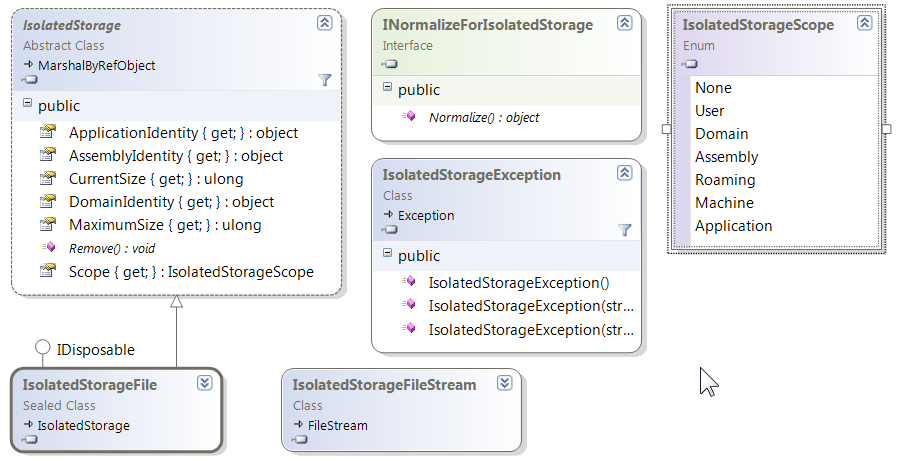
System.IO.IsolatedStorage namespace. On the desktop framework the classes in there are shown on the following class diagram (with the 2 most interesting classes collapsed for exploration later):
Note that in the Silverlight implementation there is
no base abstract class
IsolatedStorage as on the desktop or
INormalizeForIsolatedStorage interface or
IsolatedStorageScope enumeration. If you explore the desktop capabilities following the links above and relate them to Silverlight's restrictions you'll see why that is – I will not explore that in this post. Also note that the
IsolatedStorageException class
is available in Silverlight.
On the flip side, when looking in the namespace in the Silvelright version of mscorlib we additionally find the
IsolatedStorageSecurityOptions enumeration that is only used by the other new type in the namespace: the
IsolatedStorageSecurityState class which itself is not used or exposed publically by anything AFAICT! So basically, just ignore these two types for now as I can only presume that someone forgot to mark them as internal.
Using ItSo back to looking at useful classes, and we are left with the 2 that exist in both variants (that are collapsed on the diagram further above):
IsolatedStorageFile and
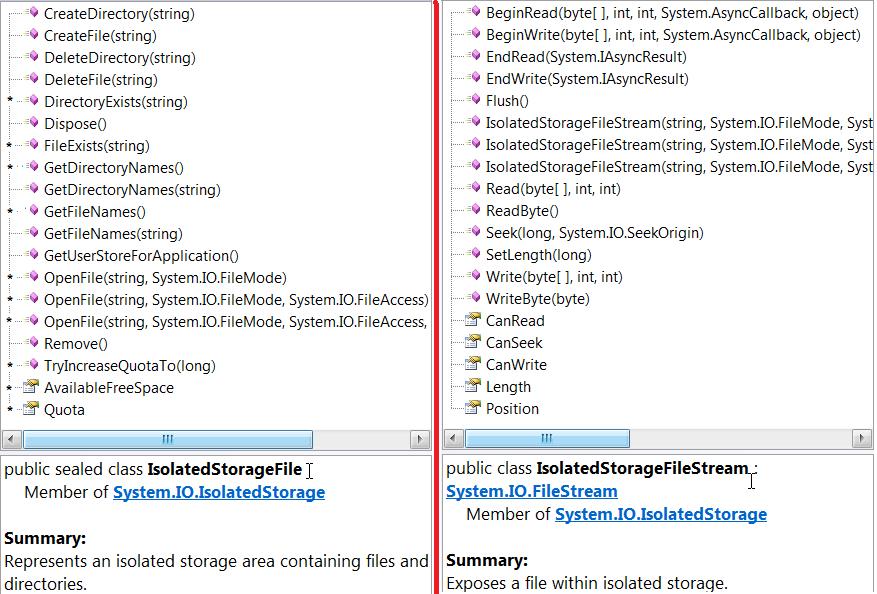
IsolatedStorageFileStream. If you follow the links to the Silverlight documentation for those you'll find some differences compared to the desktop version and maybe the eagle-eyed among you can spot them in the following list of methods:
The
IsolatedStorageFileStream class is the same as the desktop version but it omits 5
overloads of the constructor (the ones that have a
bufferSize option and the ones that do not have the
IsolatedStorageFile argument). The
IsolatedStorageFile class has 12 static methods removed (the
GetXXX methods except one) and also adds 10 members of its own (I have marked these with an asterisk * in the screenshot above).
OK, enough of API spelunking; how do you use this thing? That's the easiest part as you just
follow the pattern of:
1. Obtaining an
IsolatedStorageFile (e.g. via the static method
GetUserStoreForApplication)
2.
Creating an
IsolatedStorageFileStream object passing it in the reference from step one
3. Creating a normal
System.IO. StreamWriter or
StreamReader passing it in the reference from step two
4. Using the
Stream to read or write as per usual.
I have a
basic SL app that uses iso storage here so have a play by entering some text/values and close/reopen the browser to see them remembered. To look at the code,
follow the steps here. To browse on your local machine to the storage, paste this in your windows explorer (and drill in to find a
moth file and a
_LocalSettings):
%userprofile%\AppData\LocalLow\Microsoft\Silverlight\is
Wait, There Is MoreWhat other things must you know? There is a default disc quota that Silverlight apps have and your app can request an increase (
IncreaseQuotaTo) from the user, but only from the UI thread. There is a
good explanation of that and more here. You may also be thinking what type of data you should be storing in iso storage (e.g. things that the browser caches anyway are not good candidates) and Chris
has some opinions here (even if some of his facts are outdated).
In addition to all of the above, Silverlight adds a unique class (no equivalent on the desktop yet) that makes it easy to store application settings in isolated store: System.IO.IsolatedStorage.
ApplicationSettings in
System.Windows.dll. There are examples of its usage
here and
here (and I also use it in my basic sample above). If you are the decompiling type, look through reflector at the class's
Save method to see how it uses the lower level APIs discussed further above combined with a
MemoryStream ;-)