The Moth
Developer, Former MVP, now at Microsoft - Best of
2004
,
2005
,
2006
,
2007
,
2008
,
2009
« Get Orcas Beta 1
|
Home
|
VB intellisense in Orcas »
Aesthetic and usability in Orcas B1
Fri, April 20, 2007, 05:15 AM under
Orcas
|
VisualStudio
After installing
Beta 1
on my Vista machine, I found that the look and feel of things I previously blogged about had changed for the better.
* Ctlr+Tab got a facelift. For previous screenshot and the new one see my updated blog post:
Ctrl+Tab in Orcas
.
* The ability to target multiple framework versions from a single IDE is still there but now it is more obvious (they must have heard my winging
). Check out my updated post on
Multi-targeting
.
* For Smart Device Projects, I complained about the combobox not remembering the selection and now that is fixed. The VSD team also added a bonus feature in this release. Check out my updated post on the new
Project Dialog
.
* Like in previous builds, we have nice rounded selections in the menus...
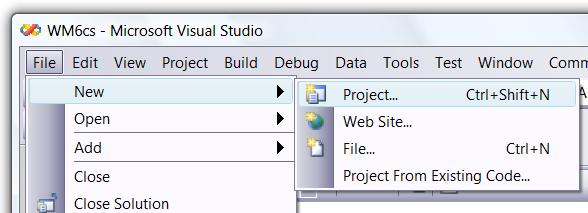
...if you complete the action of the screenshot above, you will of course get
this dialog
. Notice how the treeview under Project Types displays no plus/minus for expanding/collapsing the nodes? If however you hover the mouse on the treeview then new triangle expandos appear as per the following screenshot:
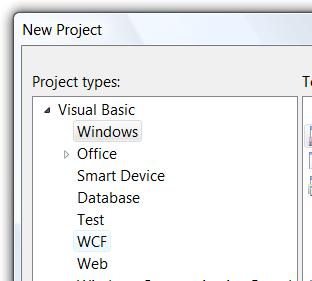
For more on what is going on here read my post on
TreeView Vista
(basically the VS team put in the extra effort to spice this up on Vista
).
Comments [0]
|
Permalink
Comments are closed.
About
My team's page on MSDN
Subscribe
Contact Form
My screencasts on channel9
Tags
AboutPresenting (5)
Blogging (7)
Career (5)
Communication (5)
dotNET (120)
Events (93)
GPGPU (2)
HPC (6)
IE7 RSS (6)
Links (129)
LINQ (23)
MobileAndEmbedded (148)
Orcas (128)
ParallelComputing (63)
Personal (32)
Random (42)
SideShow (12)
Silverlight (17)
SoftwareProcess (3)
UAC (14)
UserInterfaceDesign (5)
Vista (84)
VisualStudio (112)
Whidbey (31)
Windows (90)
WindowsServer2008 (3)
Latest Posts
Parallel Computing Platform Developer Lab
Slides and code for MPI Cluster Debugger
DirectCompute
GPGPU
Code for Parallelism Features Tour
Managed code and the Shell – Do?
Dev Lead Job opening on my team
Best of "The Moth" 2009
Bug Triage
Parallel Computing Features Tour in VS2010
MPI Cluster Debugger launch integration in VS2010
Parallel Debugging
"Parallel Programming Talk" show
Message Passing Interface (MPI)
Windows HPC Server links
Extension Manager in Visual Studio 2010
Core debugger enhancements in VS2010
Dump debugging with Parallel Stacks
Slides for Parallel Debugging windows
MPI Project Template for VS2010
Archives
March, 2010 (2)
February, 2010 (3)
January, 2010 (3)
December, 2009 (1)
November, 2009 (11)
October, 2009 (12)
September, 2009 (1)
August, 2009 (6)
July, 2009 (5)
June, 2009 (3)
May, 2009 (7)
April, 2009 (5)
March, 2009 (3)
February, 2009 (4)
January, 2009 (6)
December, 2008 (3)
November, 2008 (12)
October, 2008 (6)
September, 2008 (9)
August, 2008 (5)
July, 2008 (5)
June, 2008 (8)
May, 2008 (18)
April, 2008 (11)
March, 2008 (13)
February, 2008 (17)
January, 2008 (15)
December, 2007 (20)
November, 2007 (25)
October, 2007 (19)
September, 2007 (11)
August, 2007 (31)
July, 2007 (24)
June, 2007 (19)
May, 2007 (24)
April, 2007 (18)
March, 2007 (35)
February, 2007 (34)
January, 2007 (17)
December, 2006 (18)
November, 2006 (17)
October, 2006 (23)
September, 2006 (22)
August, 2006 (15)
July, 2006 (15)
June, 2006 (13)
May, 2006 (10)
April, 2006 (5)
March, 2006 (1)
February, 2006 (1)
January, 2006 (2)
December, 2005 (5)
November, 2005 (4)
October, 2005 (3)
September, 2005 (8)
August, 2005 (17)
July, 2005 (11)
June, 2005 (7)
May, 2005 (24)
April, 2005 (15)
March, 2005 (15)
February, 2005 (18)
January, 2005 (23)
December, 2004 (24)
November, 2004 (25)
October, 2004 (10)
September, 2004 (23)
August, 2004 (12)
July, 2004 (1)